

How it works
1. Export a lap
From PushLap, RaceBox or AiM Race Studio.
2. Drop it in
One file with several laps, or one file for each lap.
3. See where the time goes
The time you gain and lose in each corner.
Your laps
- Works with
- PushLap
- RaceBox
- AiM Race Studio
Pick your lap files and see where the time goes: both lap times, the gap, and the time gained or lost in each corner, with a report you can save as a PDF. Free, with no sign-up.
What you get
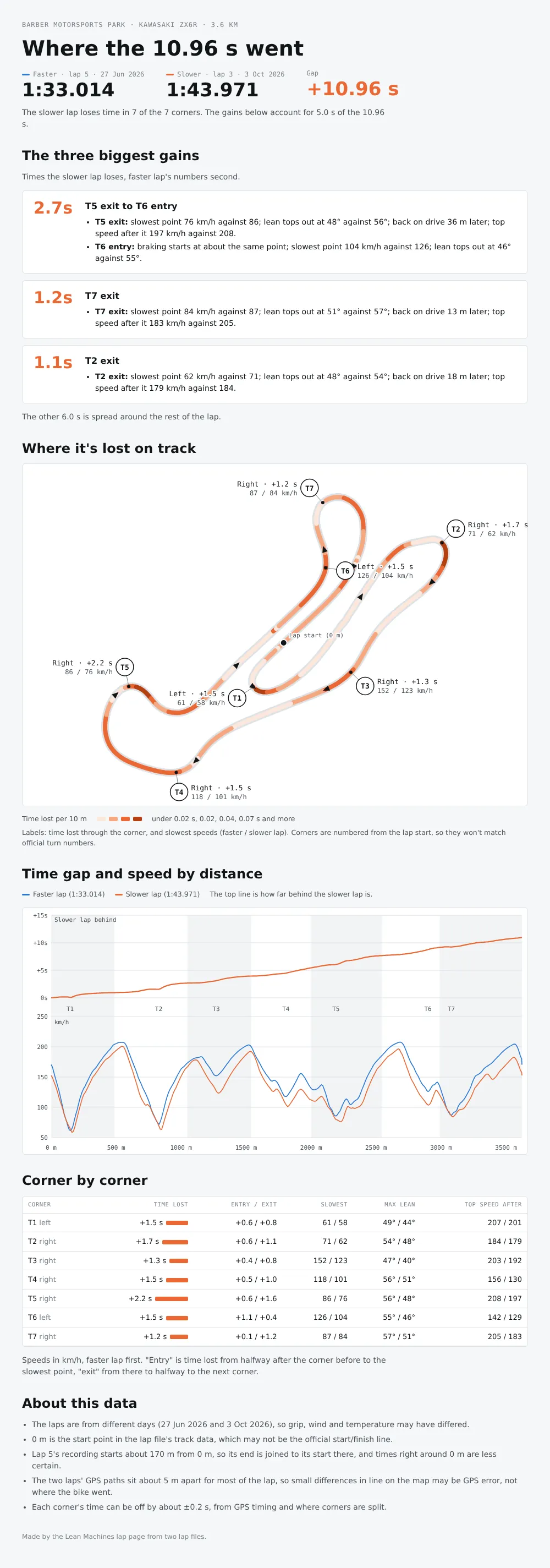
A real report, from two of our own laps at Barber Motorsports Park. Click it to see it all.
Your result
- Gap
The coach's advice
Ask the coach
Want to try these corners on a track-prepped bike?
What happens to your lap files
Your lap files are read to work out these numbers, then thrown away. They aren't saved, aren't shown to anyone else and aren't sent to any AI. The report is drawn in your own browser, and only you see it. To stop misuse, Cloudflare Turnstile checks you're a person, and the page counts comparisons per visitor using a scrambled form of your IP address, which is forgotten after a minute.
With a code, the numbers worked out from your laps (lap times, speeds, braking and so on), the track name and your bike are sent to our track coach, which sends them to Anthropic's Claude to write the advice. Your questions go the same way. The coach keeps them for 24 to 48 hours, then deletes them. It never gets your code, only a scrambled form of it. To stop guessing, wrong codes are counted for an hour using the scrambled form of your IP address.